Installation & Setup
Learn how to install and set up the LLMify Craft CMS plugin.
Requirements
- Craft CMS 5.0.0 or later
- PHP 8.2 or later
AI-Assisted Setup
If you use Claude Code or other AI tools, LLMify ships with a built-in setup skill. To use it paste this markdown into .claude/skills/install-llmify/SKILL.md.
---
name: install-llmify
description: Install and configure the LLMify Craft CMS plugin step by step
---

# Install and Configure LLMify for Craft CMS

This guide tells an AI agent how to install and set up the LLMify plugin in a Craft CMS 5 project.

## Step 1: Install the Plugin

Run the following commands in the Craft project root:

```bash
composer require samuelreichor/craft-llmify
php craft plugin/install llmify
```

If the project uses DDEV:

```bash
ddev composer require samuelreichor/craft-llmify
ddev craft plugin/install llmify
```

## Step 2: Enable Sections

1. In the Craft control panel, go to **LLMify → Content**.
2. Enable each section that should produce markdown output using the `Enable for Section` toggle.
3. Set an **LLM Title** and **LLM Description** for each enabled section. These populate the `llms.txt` file.

## Step 3: Add Template Tags

Wrap the content you want converted to markdown with the `{% llmify %}` tag in your Twig templates:

```twig
{% llmify %}
  <h1>{{ entry.title }}</h1>
  <div>{{ entry.bodyContent }}</div>
{% endllmify %}
```

Multiple `{% llmify %}` blocks per template are supported. Their content is merged into a single markdown file.

To exclude specific parts within an llmify block:

```twig
{% llmify %}
  <h1>{{ entry.title }}</h1>
  {% excludeLlmify %}
    <nav>...</nav>
  {% endexcludeLlmify %}
  <div>{{ entry.bodyContent }}</div>
{% endllmify %}
```

You can also exclude content by adding the `exclude-llmify` CSS class to any HTML element. This class name is configurable via the config file.

## Step 4: Check the Dashboard

Markdown is rendered on the first request of a page and cached, so nothing has to be generated upfront. Go to **LLMify → Dashboard** to see an overview of your setup:

- **Site setup score**: shows how complete your site-level configuration is (LLM title, description, note, front matter fields).
- **Cache**: how many pages are cached, and the pages whose markdown could not be rendered, with the reason.
- **Section statistics**: content-level stats per section.

To cache every page upfront, e.g. after a deployment:

```bash
php craft llmify/markdown/generate
```

To clear the markdown cache:

```bash
php craft clear-caches/llmify
```

## Step 5: Verify the Output

Verify these URLs are accessible:

- `/llms.txt`: Summary file listing all enabled entries
- `/.well-known/llms.txt`: RFC 8615 compliant discovery endpoint
- `/{entry-uri}.md`: Individual markdown page, homepage at `/index.md` (prefixed with `markdownUrlPrefix` if set, e.g. `/raw/{entry-uri}.md`)

Test auto-serve markdown with:

```bash
curl -H "Accept: text/markdown" https://your-site.com/your-entry-url
```

## Full Documentation

For detailed configuration options and advanced usage, see the [LLMify documentation](https://samuelreichor.at/libraries/craft-llmify).
Then just run /install-llmify in your Craft project directory and the assistant will do the development setup for you. You just need to adjust the content settings for your needs.
Craft Plugin Store
To install LLMify, go to the Plugin Store in your Craft control panel, search for "LLMify," and click the Install button.
Composer
ddev composer require samuelreichor/craft-llmify &&
ddev craft plugin/install llmify
composer require samuelreichor/craft-llmify &&
php craft plugin/install llmify
Setup
Enable Sections
In the Craft control panel, go to LLMify > Content and enable each section that should produce Markdown output using the Enable for Section toggle.
Set an LLM Title and LLM Description for each enabled section, these populate the llms.txt file.
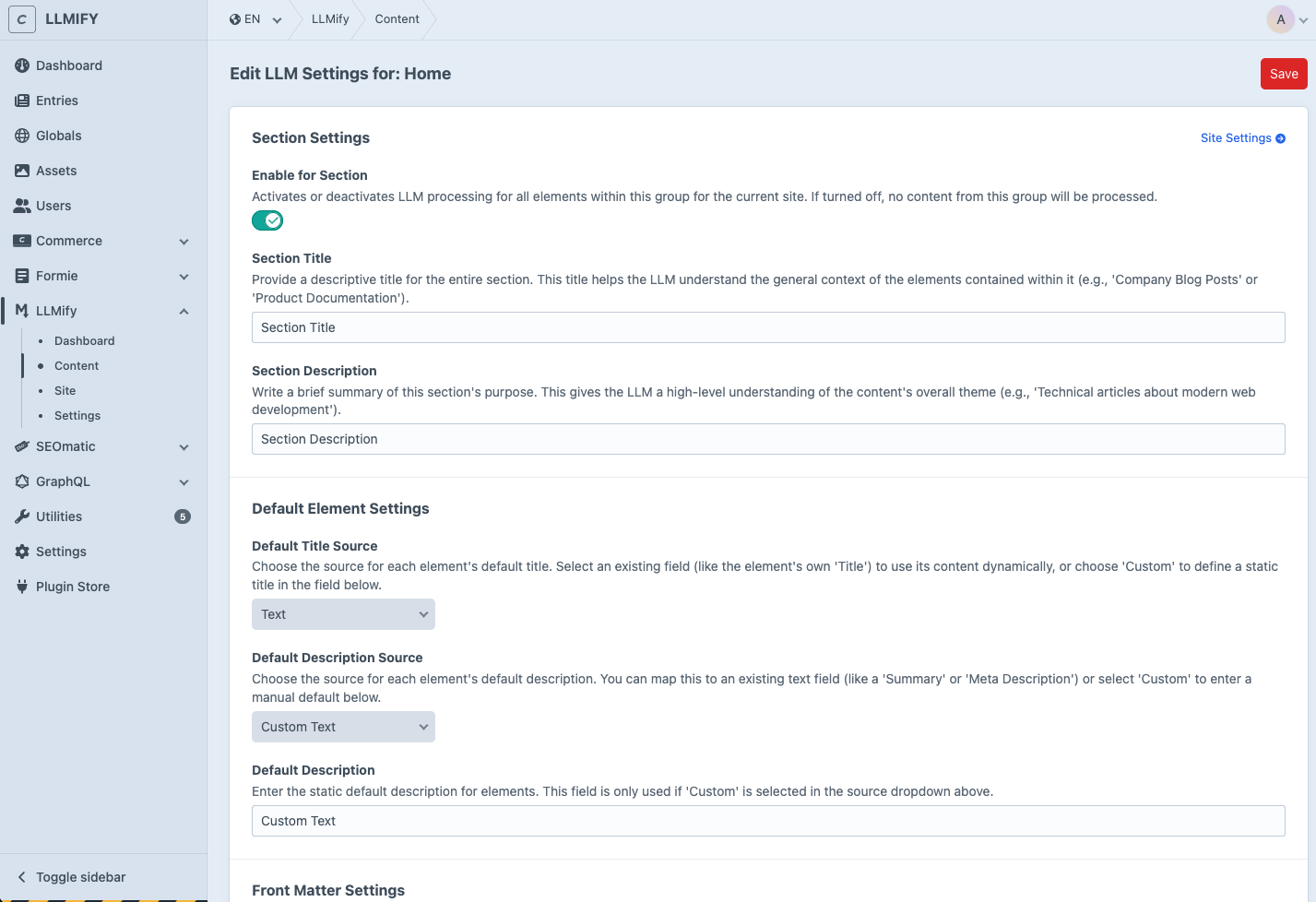
Learn more about Content Settings in the Basic Overview.
Add Template Tags
Wrap the content you want converted to Markdown with the {% llmify %} tag in your Twig templates:
{% llmify %}
  <h1>{{ entry.title }}</h1>
  <div>{{ entry.bodyContent }}</div>
{% endllmify %}
Multiple {% llmify %} blocks per template are supported, their content is merged into a single Markdown file.
Learn more about template tags and other content control options on the Content Control page.
Verify the Output
These URLs should now be accessible on your site:
/llms.txtand/.well-known/llms.txt: list of all URLs with descriptions/{your-uri}.md: Markdown for a single entry,/index.mdfor the homepage
You can also test auto-serve and bot detection:
curl -H "Accept: text/markdown" https://your-site.com/your-entry-url
curl -A "GPTBot/1.0" https://your-site.com/your-entry-url
Add AI Bot Analytics (Optional)
Want to see which AI crawlers actually hit your Markdown, how often, and which pages they read? Install Craft Insights alongside LLMify and a dedicated dashboard appears in the Insights subnav.
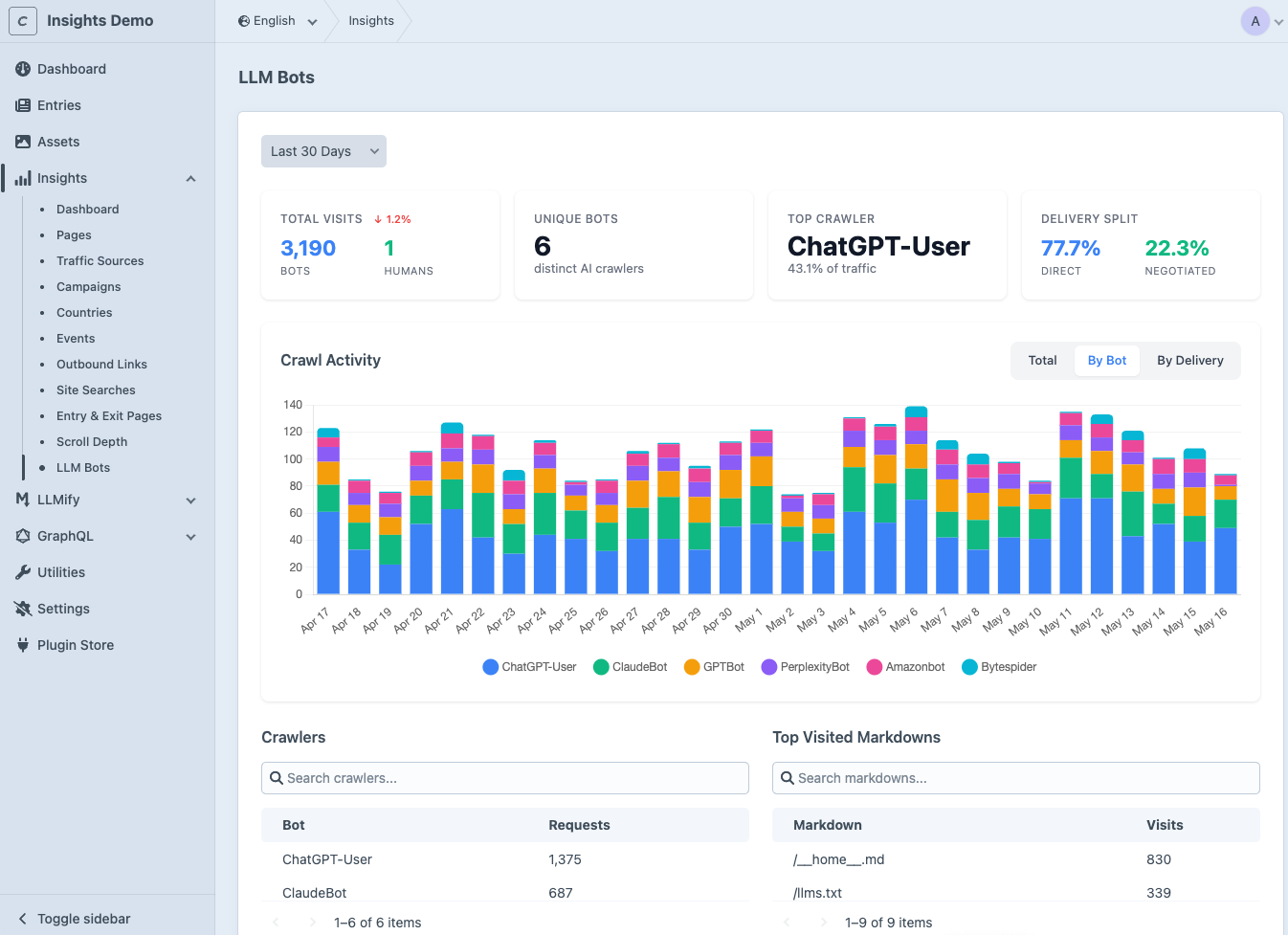
The integration activates automatically when both plugins are installed. See the AI Bot Analytics page for the full setup.
You're all set. Head over to the Basic Overview to learn about the Dashboard, Permissions, and other features.
Upgrading from 1.x
LLMify 2.0 no longer generates Markdown with queue jobs and stores it in the database. It renders the Markdown of a page on its first request and keeps it in Craft's data cache, invalidated by Craft's element cache tags. See How Caching Works for the details. The requirements stay the same.
Measured on a production Craft site with SEOmatic and Formie (running locally, 20 pages, 5 runs each), time to first byte in milliseconds, median with p95 in brackets:
The HTML page shows that serving Markdown adds no cost to normal page requests.
Update the Plugin
ddev composer require samuelreichor/craft-llmify:^2.0 &&
ddev craft up
composer require samuelreichor/craft-llmify:^2.0 &&
php craft up
The migrations drop the llmify_pages table and the llms-full.txt settings. Your site, content and plugin settings are kept. All Markdown is rendered again on the next request of each page.
Remove llms-full.txt
llms-full.txt was removed in 2.0. /llms-full.txt now returns a 404 and the llms-full-txt API endpoint is gone.
- Remove links to
llms-full.txt, e.g. fromrobots.txtor a headless front end that re-serves it. - Remove
frontMatterInFullTxtfromconfig/llmify.php, it has no effect anymore.
Update Custom Code
If your modules or plugins used LLMify's PHP API, replace these:
Also remove the X-Llmify-Refresh-Request header from server configs or cache exclusions (e.g. Blitz or CDN rules) that referenced it.
Check Your Templates
Markdown is now rendered from the section's template inside the request that asks for it. While it renders, the template sees the public page as an anonymous visitor: its own URL, no logged-in user, no query string, no cookies and a neutral User-Agent.
- Content that depends on the current user, query parameters or cookies does not end up in the Markdown.
- Pages whose route a module changes to a controller action cannot be rendered. The Dashboard lists them with the reason.
In headless mode nothing changes for your templates: the front end is fetched on the first request of a page instead of by a queue job.
Review the Cache Setup
- Cache duration: Markdown stays cached for at most
cacheDurationseconds,86400by default. - Clearing Craft's caches (e.g.
php craft clear-caches/allin a deploy script) now also clears the Markdown. It is rendered again on the next request. - Load-balanced setups need a shared cache component like Redis, the same as for Craft's
{% cache %}tags. Otherwise a change only invalidates the Markdown on the server that saved it. basicAuthUsernameandbasicAuthPasswordare only used for warming the cache now. Serving Markdown does not request your site anymore.
Warm the Cache (Optional)
Nothing has to be generated upfront anymore. Cron jobs that run llmify/markdown/generate keep working, they now cache every page that is not cached yet. Keep them if you want every page to be fast from the first request, otherwise remove them. See Console Commands.
The permissions Generate Markdown and Clear Markdown are now called Warm Markdown Cache and Clear Markdown Cache. Their handles did not change, so user groups keep them.
Support
If you encounter bugs or have feature requests, please submit an issue. Your feedback helps improve the plugin!