Permissions
Understand how CoPilot permissions work together with Craft user permissions to control access.
CoPilot uses a two-layer permission system. Both layers must allow an action for it to succeed.
- Plugin settings: Control what the agent can access (sections, volumes, categories)
- Native user permissions: Control what the logged-in user can do
How They Work Together
When the agent tries to read or write content, both layers are checked:
In short: the agent can never do more than what both the plugin settings and the user's Craft permissions allow.
Admin users bypass Craft's native permission checks but are still restricted by the plugin's access settings. If a section is set to read-only or blocked in the plugin, even admins cannot write to it through the agent.
Plugin Access Settings
These are configured in Settings → CoPilot → Permissions and control what the agent is allowed to do per section, volume, and category group.
Blocked Element Types
You can block entire element types from the agent. By default, Commerce Orders are blocked. This is useful for preventing the agent from interacting with sensitive element types entirely.
// config/co-pilot.php
return [
  '*' => [
    'blockedElementTypes' => [
      'craft\commerce\elements\Order',
    ],
  ],
]
Blocked element types are checked first, they take priority over all other access settings and user permissions.
Craft User Permissions
CoPilot registers its own set of user permissions in Craft. You can assign them to user groups under Settings → Users → User Groups.
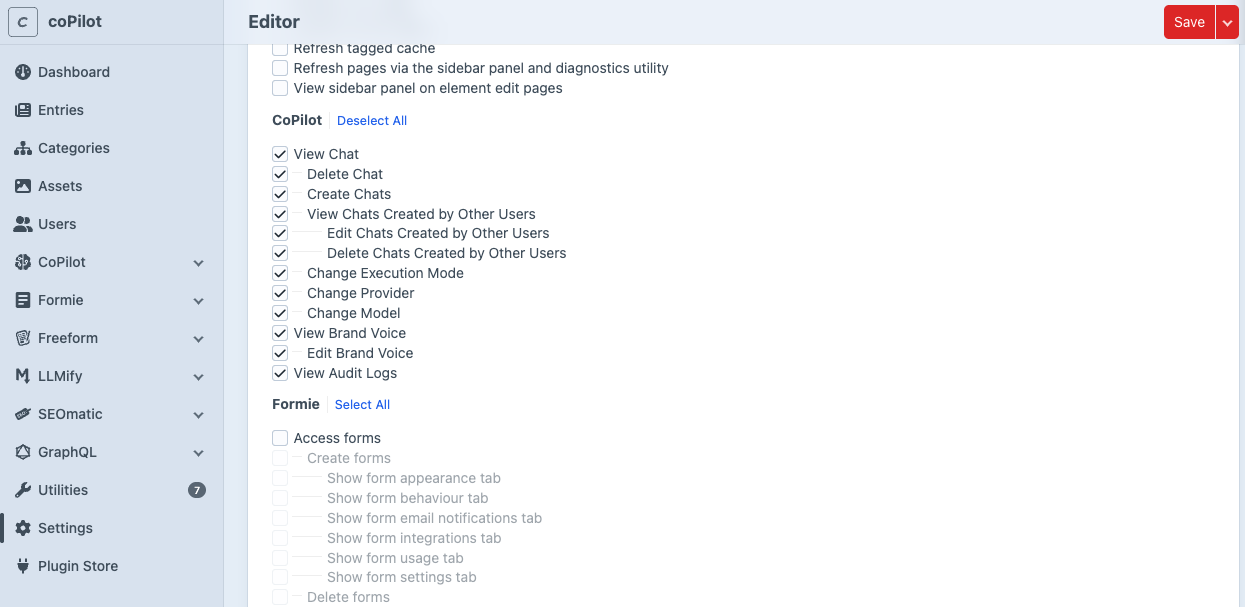
With that you can restrict users to only see there own chats or prevent them to edit the brand voice.